

“Looking for a free editable wedding welcome sign template google docs? Planning a wedding on a budget and tired of paying $30 to $50 for a printable sign on Etsy? This guide lets you design your own sign in about twenty minutes, using software you probably already have open right now.”
No design software to install, no subscription, and no waiting on a designer to send revisions. You type it, you format it, you print it.
What Is a Wedding Welcome Sign and How a Free Editable Wedding Welcome Sign Template Google Docs Helps
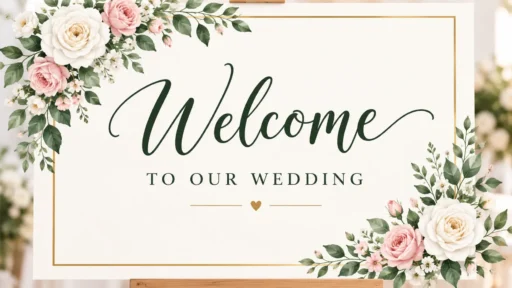
A welcome sign is the first thing guests will see when they arrive. Usually you’ll have an easel sign with your names, date and a short welcome message.
While not essential it makes a great addition to your wedding. It tells your guests they’re in the right place and adds to the theme of your day. Whether it be a formal, rustic, modern or playful theme. It also acts as a beautiful decoration that can be photographed and kept as a keepsake.
Why Use Google Docs Instead of Canva or Photoshop?
Most wedding sign templates live on Canva or get sold as Photoshop files. Google Docs isn’t built for graphic design, but it handles a sign that’s mostly text just fine, and it beats the fancier tools in three ways.
- You already have a Google account, so there’s nothing new to sign up for.
- It’s free forever, not “free with a watermark unless you upgrade.”
- You can share the doc with your fiancé or a detail-oriented friend, and they can edit it live.
The trade-off: Google Docs can’t do layered graphics or transparent PNG exports. If you want illustrated flowers or a gold foil texture, Canva will look better. For a clean, typography-led sign, Google Docs gets the job done.
How to Make Your Wedding Welcome Sign in Google Docs, Step by Step
- Open a new Google Doc and go to File > Page setup. Choose Custom and enter your sign’s exact size, such as 18 x 24 inches.
- Set the orientation (portrait or landscape) to match the frame or easel you’ll be using.
- Insert a text box through Insert > Drawing > New, so you can center and style your message independently of the page margins.
- Pick two fonts and stop there: one serif for your names, one simple sans-serif for the date and smaller details.
- Type the core text, something like “Welcome to the wedding of [Name] & [Name],” the date, and one short welcome line.
- Add a thin border or a single decorative line with the drawing tool instead of clip art, which tends to look dated at a large print size.
- Download the file as a PDF through File > Download > PDF for the sharpest print quality, rather than printing straight from the browser.
Free Wedding Welcome Sign Wording You Can Copy
Not sure what to actually write? Start from one of these and swap in your names.
| Style | Best For | Sample Wording |
| Classic / Formal | Traditional church or ballroom weddings | “Together with their families, [Name] and [Name] welcome you to their wedding celebration.” |
| Modern / Minimal | City venues, lofts, art galleries | “Welcome to the wedding of [Name] & [Name]. [Date].” |
| Rustic / Casual | Barn, farm, or outdoor weddings | “Y’all made it! Welcome to our wedding — grab a seat, we’re so glad you’re here.” |
| Playful | Couples who want a laugh, not a lecture | “We’re getting married! (Finally.) Welcome, and thanks for coming.” |
What to Put on a Wedding Welcome Sign (and What to Skip)
Keep the sign easy to read from a few feet away. Include:
- Both of your names
- The wedding date
- One short welcome line
- Optional: venue name, wedding hashtag, or a short love-story line
Leave off the full ceremony timeline, a long paragraph, or guest instructions — those belong on a separate program or sign, not the welcome sign.
Common Mistakes People Make With DIY Wedding Signs
- Designing at screen size and printing huge. Text that reads fine on a laptop can look tiny on a 24×36 sign, so check it at 100% zoom or print a small test page first.
- Leaving the default font size. Bump your main heading to at least 80 to 100 points for a standard welcome sign.
- Forgetting the margins. Leave at least half an inch of blank space around every edge so nothing gets cut off in the frame or during printing.
- Skipping a test print. Colors and spacing often shift between screen and paper, and it’s cheaper to catch that on regular paper than on your final cardstock.
Where to Find Free Wedding Welcome Sign Templates
A few legitimate places to start if you’d rather adapt a layout than build one from scratch:
- Google Docs template gallery (docs.google.com) — search “wedding” inside Docs for built-in starter layouts.
- Canva (canva.com) — free wedding welcome sign templates you can rework, then rebuild as editable text in Google Docs.
- Etsy (etsy.com) — many sellers list free or low-cost editable wedding sign templates, usually as Canva links.
- The Knot and WeddingWire — both publish free printable wedding sign templates aimed at DIY couples.
Frequently Asked Questions
Is a Google Docs wedding welcome sign actually free?
Yes. Google Docs is free with any Google account, and you are not paying for a template license since you build the sign yourself with Docs’ built-in text and drawing tools.
What size should I make my wedding welcome sign?
Most welcome signs for an easel are printed at 18×24 inches or 24×36 inches. Set this exact size under File > Page setup > Custom before you start designing, so your text scales correctly.
Can I print a Google Docs wedding sign at a print shop like FedEx or Staples?
Yes. Download the finished sign as a PDF, not a Google Doc link, and bring that file to any print shop. A PDF keeps your fonts and layout exactly as designed.
What’s the easiest font pairing for a wedding welcome sign?
A classic combo is a serif font like Playfair Display or Cormorant for your names, paired with a clean sans-serif like Montserrat or Lato for the date and smaller details.
Do I need design experience to make one in Google Docs?
No. If you can use a text box and change a font size, you can make a clean welcome sign. This guide’s approach, two fonts and a simple layout, is built for people without design training.
Can the welcome sign match my wedding invitations?
Yes, as long as you use the same two fonts and color scheme on both. Google Docs lets you enter exact hex color codes under Custom in the text color picker, so you can match your invitation colors precisely.
The Bottom Line
No need to spend money on a design for your welcome sign! Just create a new Google Doc and adjust the page size to the exact dimensions you want. Type your names and date into the document and use just 2 fonts. Print a small version to test it out and you’ll have a bespoke looking sign at no extra cost!